Built for your school

Interviews booked. Roll taken. Exams marked. One calm system.

MySchool.Life gives the people who run a school one place for parent-teacher interviews, daily attendance, exams marked from a phone and announcements that reach exactly the right families — with apps for every admin, teacher, parent and student, and no per-student fees.

Set up in an afternoon. Your student information system stays where it is. No card required to start.

Today · one schoolLive
132 / 255rolls filed — teachers tapped, students scanned, one paper sheet photographed
23 parentsnotified of an unexplained absence, on their phones
28 answer sheetsphotographed and marked — Biology 20 quiz, results ready before lunch
41 / 48interview slots booked by parents from a link — no phone calls
booked · waitlist · open
Every role, one login. Admins, teachers, parents and students — including families with children at more than one school.
Data stored in Canada. One database, in Toronto — for every school. No ads, no data selling, no AI training on student data. How we support your obligations →
Web, iOS and Android. Native apps with push notifications and a camera scanner, in early access.
Priced per school. All features, no per-student fees, and no procurement marathon.

How it works

One school day, without the paperwork.

Four moments every school lives through, and what each one looks like when it runs on MySchool.Life.

08:15 · Attendance

Teachers take the roll in seconds

Today's classes come from the timetable. One tap opens the register; tap, scan or photograph — the grid is always the final word.
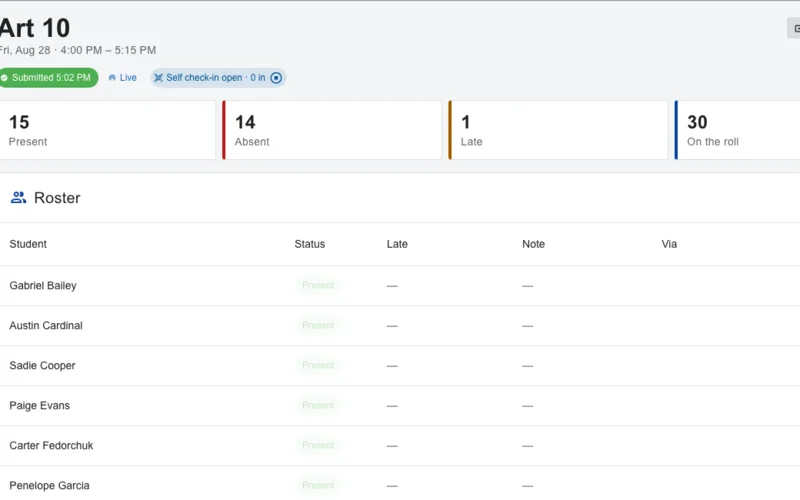
A teacher's attendance register for Art 10 showing present, absent and late counts and the class roster
09:02 · Office

The office sees the whole school, live

Rolls land on the board as they're filed. The unmarked list shrinks; parents of absent students get a push or an email after the nudge delay you set.
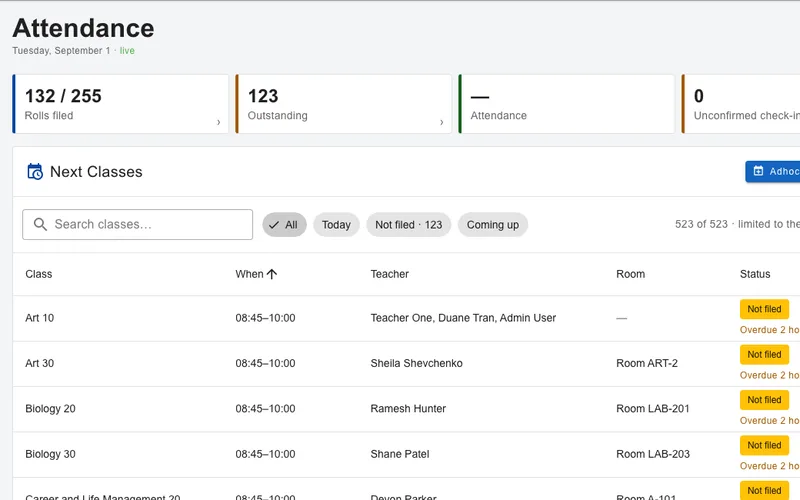
The administrator's live attendance overview: rolls filed 132 of 255, next classes and their status
10:40 · Exams

A quiz is marked before lunch

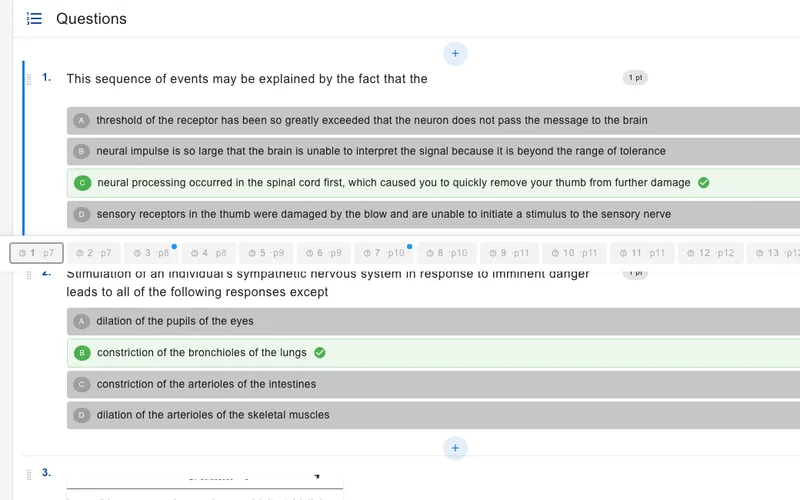
Print the answer sheets from the exam, photograph the completed pile with a phone. The class average, the high and the low, and each student’s question-by-question breakdown are on screen before the bell.
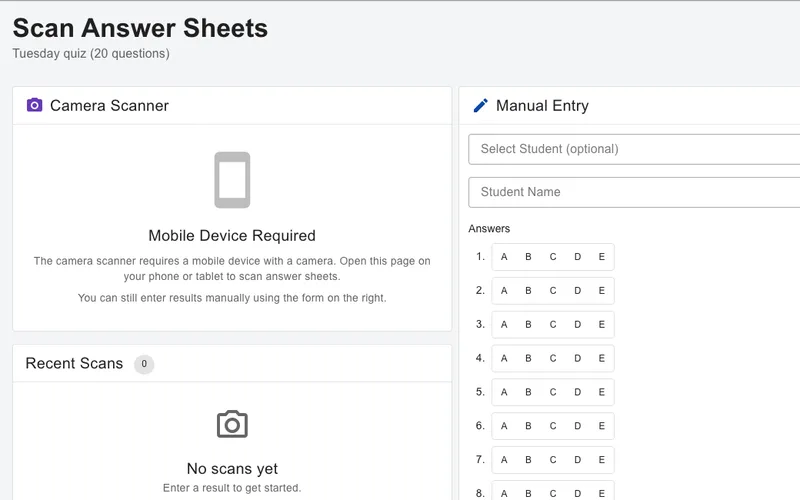
Scan Marker: the camera scanner and manual entry view for a 20-question quiz
15:30 · Interviews

Parents book themselves in

Publish the interview event, send one link. Parents pick a slot from their phone — no account needed — and get reminders. Waitlists fill cancellations.
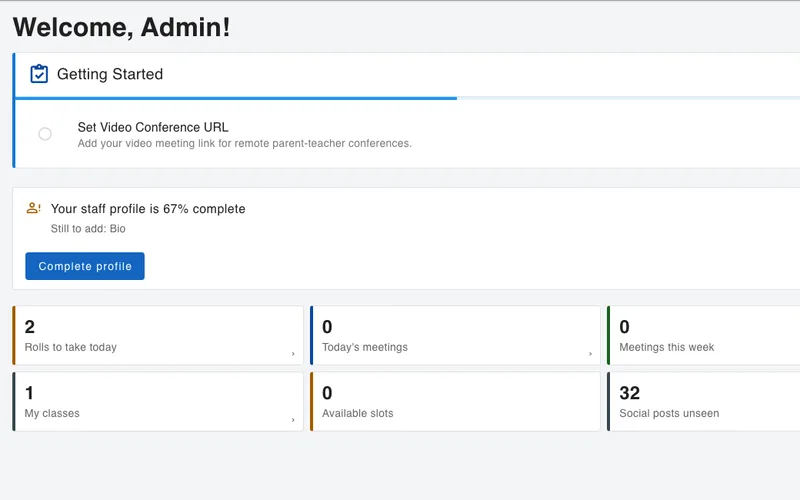
A teacher's dashboard showing rolls to take today, today's meetings and meetings this week

Features

Everything the SIS leaves to the office.

Nine product areas, one login, one bill. Each works alone; together they remove most of the paper — and most of the separate subscriptions — from a school year.

Events & interviews · 15:30
Parent-teacher interviews, open houses and ticketed nights — booked from a link

  • Teacher slot booking with waitlistsParents book every child and every teacher in one sitting; clashes are prevented; cancellations fill from the waitlist.
  • No account needed to bookA magic link works for enrolled parents and for guests. Those who install the app get reminders and tickets on their phone.
  • Guest events, group bookings, multi-section eventsSports days, concerts, information nights — with registration, capacity and sections or rooms.
  • QR tickets and a multi-station scannerSigned, time-limited QR tickets; staff scan at the door with their phones; live check-in counts in the office.
  • Create the next event from the last oneTemplates and copy-from-existing, with an AI assistant to draft descriptions if you want it.
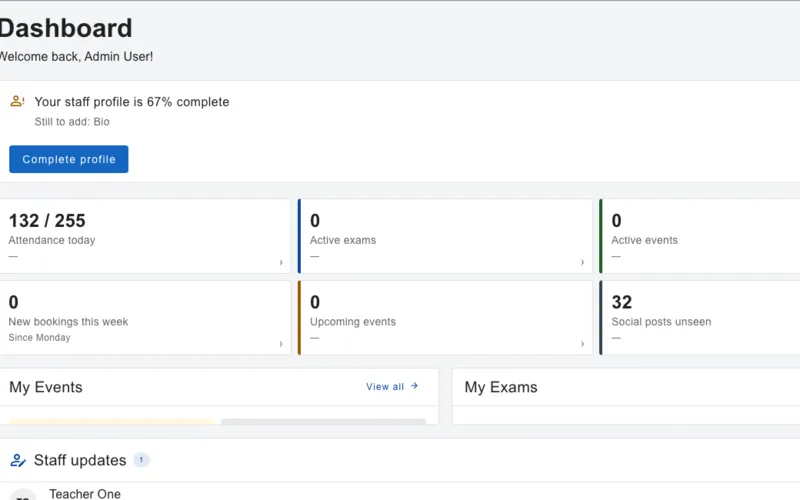
The administrator dashboard: attendance today, new bookings this week, upcoming events and quick actions
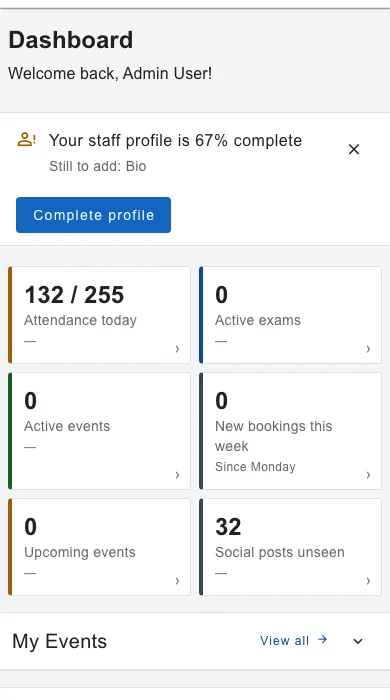
The mobile dashboard with attendance, exams and events at a glance

Attendance · 08:15

Four ways to take the roll. One live board. Parents told the moment it matters.

Which classes should take a roll today is computed from the timetable — so a late holiday or a schedule change never breaks the day. Teachers' grids stay the final authority no matter how a mark was captured, and Submit is the single act that notifies.
Mode 1Tap the gridDefault present or absent per school; drafts save on touch; works offline and syncs later.
Mode 2Projected QRStudents scan a rotating code on the board; verified by geofence and/or school network, inside a grace window.
Mode 3Scan student cardsTeachers scan printed student QR cards, boarding-pass style.
Mode 4Paper roll sheetsPrint, mark with a pen, photograph — the sheet is read into the grid for review.
  • Parent alerts, reports, analyticsPush or email on an absence after a school-set delay; summary, per-student, CSV and PDF reports; trends, at-risk lists and nightly threshold alerts.
  • Codes, closures, substitutesYour own mark vocabulary; holiday and closure calendar; time-boxed substitute access per class.
Administrator attendance overview with rolls filed and classes still to take a roll
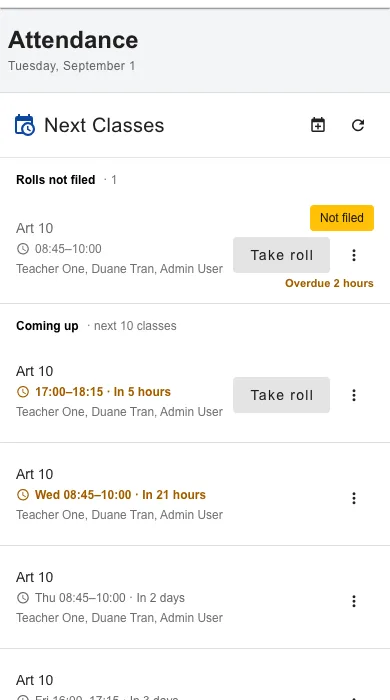
A teacher's phone showing today's classes with Take roll buttons

Exams · planning week

Write the exam once. Find the question again in three years.

  • Exam builder with an AI assistantDescribe the exam — even out loud — and get a draft to edit. Every question you keep goes into the school’s bank.
  • A question bank that gets easier to useSemantic search across every question the school has written, with learning outcomes mapped to them, so next year’s paper starts from this year’s.
  • Online exams Coming soonDeliver an exam on students’ devices with timing, monitoring and instant results — in testing now.
  • PDF exam upload Coming soonUpload the exam you already have; layout and questions are extracted for you to confirm — in testing now.
  • AI on your termsTurn AI features off school-wide or per user; bring your own API key; a teacher finalises every mark.
The exam builder with questions, points and details

Scan Marker · 10:40

Print the sheet. Photograph the pile. Marks before the bell.

Paper multiple-choice tests are not going away, and the products that grade them are bought separately — per teacher, or with a four-figure school minimum. Scan Marker does that job inside the system that already holds your classes and your students, so a scanned sheet becomes a result attached to a name.
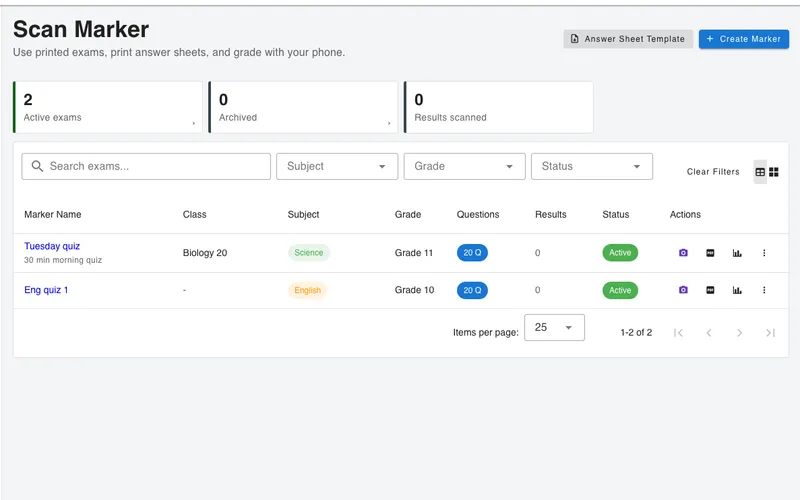
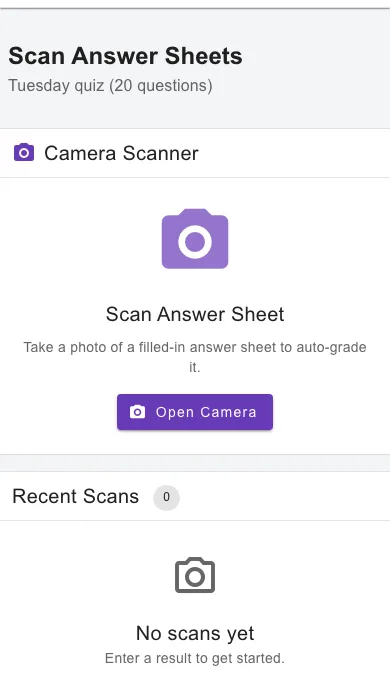
  • Multiple choice, and we say soSheets hold 20, 50 or 100 questions with four choices (A–D) or five (A–E), one bubble per question, one sheet per page. Written, short-answer and essay questions are marked by hand or built in the exam builder — Scan Marker does not pretend otherwise.
  • Sheets printed for your class, not generic onesGenerate answer sheets for a whole class with each student’s name and a QR code already printed on them, or run off blanks for a supply teacher.
  • The phone does the reading — no AI sees an answer sheetBubbles are recognised by computer vision running inside the app, on the phone itself. The handwritten name box is read by software on our own servers. Nothing about a scan is sent to an AI provider.
  • The teacher confirms who it isThe printed QR code identifies the student outright. Scan a sheet without one and the handwritten name is read and a match is proposed — a teacher confirms it. Nothing is attached to a student on its own.
  • Works where the Wi-Fi does notScans queue on the device and sync when the connection comes back, so the far end of the science block is not a problem.
  • Scores, and a breakdown per studentTotal scans, average, highest and lowest, and a question-by-question tick-and-cross for each student. Export the class as CSV, or one student’s result as a PDF.
The Scan Marker list: two active markers with their class, subject, grade and question count
Scan Marker on a phone: the camera open over an answer sheet, with manual entry as a fallback

Announcements · 12:00

Tell the whole school, or exactly one grade — without building a list.

Everyone already has an account, and the system already knows which class each student is in and which children belong to which parent. So an announcement is a post, not a mail merge and not a spreadsheet of addresses that goes stale in October.

  • Pick the people, not the listPost to everyone at the school, or to chosen roles narrowed by grade level and by class. Parents inherit their own children’s grades and classes; teachers get their own classes; a substitute is included only inside the window they are covering.
  • See the reach before you send itThe composer resolves the audience you have picked into the actual people it will reach, and shows you the number, before anything is published.
  • In the app always; email only if you chooseEvery post lands in the app immediately, and push follows each person’s own notification settings. Email is off by default and switched on per post, with one-click unsubscribe when it is used.
  • Categories, an Important flag, a date and an imageYour own categories — notices, sports, arts, celebrations — a red Important chip, one image you upload or generate, an event date with a reminder an hour, a day or a week before, scheduled publishing, and an archive date so old notices retire themselves.
  • A delivery report for every postWho was notified, who was emailed, who was pushed and who has opened it — per person, for the author of the post.

It is an announcement feed, not a chat. Posts can be liked; there are no comment threads to moderate.

The school feed: posts about a late bus route, a spring concert, a basketball final and a staff briefing, each with its category
The school feed on a phone, with category filters across the top and posts below

Evacuations · six times a year

The fire drill, without the clipboards.

An Ontario school must run a total evacuation drill at least three times each term — six a year — and keep a record of every one for a year afterwards. Most schools meet that with paper registers carried out to a field, and a number that is several minutes old by the time it reaches the principal.

  • The roll builds itself from the timetableThe moment the alarm is raised, the roster freezes: every class that was meeting, with the teacher who had it and the muster point it was told to go to. Nothing to import, nothing to keep in step — it is the same timetable that took this morning’s register.
  • Students, staff, substitutes and visitors in one countEvery enrolled student and every member of staff starts unaccounted for — only a person turns a name green. A covering teacher is added to the class rather than swapped in for the absent one, and anybody else on site can be typed in on the spot.
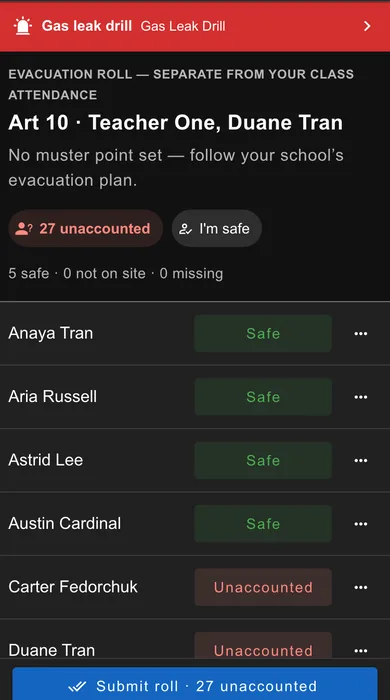
  • Marking works with no signal at allTeachers mark safe, not on site or missing on a phone in a field. Taps queue on the device and settle by the time of the tap, not the moment the phone found a signal — and the roll can be handed in offline too. Any teacher can mark any child, so a student standing in the wrong line is still found. No phone to hand? Print the muster roll, mark it with a pen and photograph it afterwards — a blank or unreadable row stays unaccounted for, never marked safe.
  • The principal watches it fill upLive counts for the whole school and for every class, which classes have not reported yet, and a searchable list of who is still unaccounted for. If nothing has come in after five minutes, and again after ten, the office is told how many rolls are outstanding and how many people are still missing.
  • Drills and real incidents, told apartTen incident types — fire, gas leak, lockdown, severe weather and more — and a drill is labelled as a drill everywhere it appears, including on the phone that lights up. Only an administrator can raise or clear one, and only one can run at a time.
  • The record writes itselfWhen you call the all clear, the report is already there: start, end, duration, time to full accounting, totals and percentage accounted for, every class with its muster point and how long it took, and a named list of the exceptions. Export it as a PDF or a per-person CSV, or email it straight to people who have no account — a superintendent, a board safety officer.

Not loaded your students yet? Start with Evacuations Lite. It is on for every school from day one and needs no student records at all. When an evacuation starts, every teacher and administrator is alerted; each sends one report from their muster point — All clear, Not clear or Missing — with a headcount, and the office watches the numbers arrive. Colleagues can take a count for someone, a person who is away can be marked not on site, and nobody is asked for a student’s name anywhere.

What this is, precisely. It is a digital roll call and the record that comes out of it — not an alarm system. MySchool.Life does not sound your alarm, and it does not contact the fire service; your fire safety plan and your alarm do that. What changes is that when the fire officer is standing at the muster point, the principal can turn a phone around instead of walking over with a clipboard.
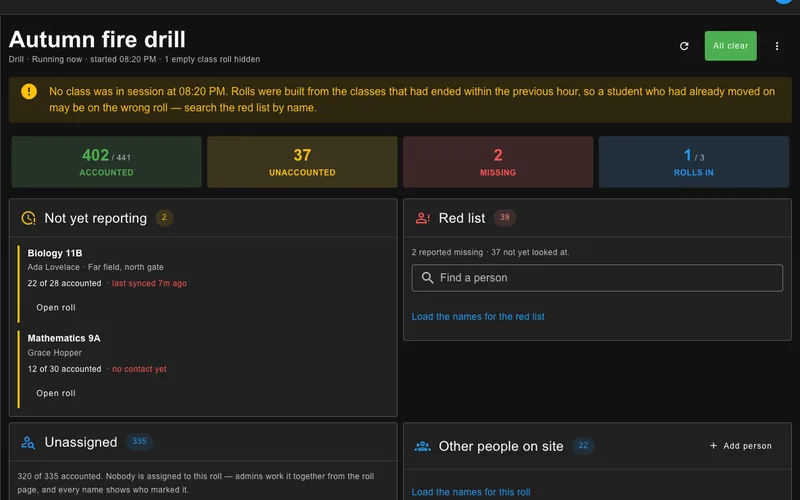
The principal's evacuation board during a fire drill: 402 of 441 accounted for, 37 unaccounted, 2 reported missing, and the two classes that have not reported yet with their muster points
A teacher's evacuation roll on a phone, marking each student safe or unaccounted for, with a submit button at the bottom

Staff & joining · all year

A staff list that keeps itself current, and a school that fills itself in.

The staff contact list is usually a spreadsheet somebody in the office updates by hand, and it is wrong by half-term. This one asks its own people to fix it, and tells you who did.
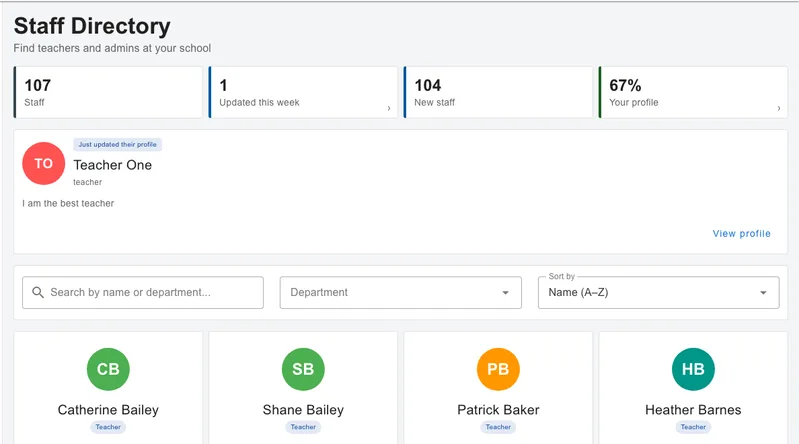
  • A directory staff will actually usePhoto, department, role, work contact details, and the answers to the questions your school decides to ask. Search by name or department, or filter to whoever changed something this week.
  • It asks once, then leaves people alone“Your profile is 67 % complete” names the fields that are missing and links straight to them. Dismiss it and it stays away for a month. One reminder goes out on a Tuesday morning to anyone still incomplete.
  • Tells you what changed, never what it saysThe updates feed names the field a colleague edited — never the value they put in it, and never a field its owner has chosen to keep private.
  • Personal details stay off until their owner turns them onMobile, home phone, home address and extra email addresses are hidden by default. A birthday shows a day and a month, never a year. A completeness score is seen only by the person it belongs to and by administrators. The directory is for teachers and administrators — parents and students never see it.
  • Staff and students join themselves; you approveSelf-signup, QR codes to join a class or a school, six kinds of invitation, parent–child link codes and roster email matching. Substitutes get time-boxed access to just the classes they are covering.
The staff directory: 107 staff, one profile updated this week, 104 new staff and a personal completeness score, above the search and the staff cards

Resource Booking

The gym, the music room, the laptop cart — booked, not argued over.

Most schools share their rooms and equipment through a paper sheet on a door or a spreadsheet nobody trusts. Here staff book them in the same app they take the roll in, and see who has what before they walk over.

  • Rooms, pitches and equipment, ready on day onePick a resource, a start and an end, and say what the booking is for. Every school starts with 14 ready-made resources — Music Room, Gymnasium, Soccer Pitch, Laptop Cart and more — and staff can add their own.
  • A clash is shown before you saveChoose a resource and a day and you see what is already booked on it, who has it and what for. A booking that overlaps someone else’s is never saved on top of theirs.
  • Nudge instead of chasing someone down the corridorNeed a time a colleague holds? Nudge them. They answer Keep or Release from their phone, and when it is released everyone who asked is told it is free — first to book gets it.
  • A morning reminder of today’s bookingsOne notification each school morning lists the day’s bookings — the easiest moment to cancel one that is no longer needed.
  • Administrators keep the list honestAn admin can cancel any booking with a reason, and the person who made it is told why. A resource that is no longer used can be archived; its past bookings are kept.
  • On a phone or at a deskA list on the phone, a sortable table on a computer — the same bookings either way. It is for teachers and administrators; parents and students never see it.
Gymnasium · Thursday4 bookings
Your bookings todayOne morning reminder — PE 10 at 08:30, basketball practice at 12:15
Clash: 14:00–15:30Already booked by Ms Rivera for Grade 11 volleyball — shown before you save
Nudge sentAsking for 14:30–15:30. She answers from her phone:
KeepRelease ✓
Free from 14:30Everyone who asked is told — first to book gets it
clash check · nudge · keep or release

Bus Safety · every trip

The pre-trip inspection, signed on a phone, not in a binder.

A school that runs its own buses keeps a daily inspection for every one of them, a list of what is broken, and a record of who drove what. Here the driver does all of it on a phone, and the office sees a bus that must not be driven the moment it is reported.

  • A daily inspection that is one scroll on a good dayDrivers walk round the bus with the checklist on their phone, sign it, and start the trip. The checklist starts from Alberta’s Schedule 2 components and their defect lists, plus your own carrier items; parts a bus does not have are left off it.
  • A Major defect takes the bus off the roadEvery defect is Minor or Major. A Major puts the bus out of service: no driver can start a trip on it, every administrator is told at once, and it stays off the road until someone signs off the repair with a note.
  • Nobody left on boardChecking in after a trip ends with a required “I walked to the back of the bus: no one is on board”. It cannot be answered N/A. If it is not OK, every administrator gets an urgent alert that cannot be muted, and a trip still out after the time you set is flagged to the office.
  • Expiry dates that warn you firstSafety certificates, registrations and driver licences alert administrators 30 days before they expire and on the day itself.
  • A record for every bus, kept for goodEvery inspection becomes a PDF report with its items, defects, photos and signature, emailed to whoever you choose for each result. Export a bus’s history as a spreadsheet or a pile of PDFs. Drivers sign their own driving time each day, and every correction the office makes is recorded with who made it and why.
  • Paper still worksPrint a checklist for any bus, let the driver mark it with a pen, then photograph it into the record. A sheet printed for another bus is refused, and a blank row counts as OK only when “Everything else is OK” is marked.

Off until you switch it on. Bus Safety only appears in a school’s menus once an administrator turns it on. Teachers, parents and students who do not drive never see it. A teacher who also drives uses the same account, with a Driver dashboard alongside their Teacher one. Recording the route of each trip is a separate setting and is off by default.

Bus 12 · Tuesday1 defect
Daily inspectionWalked round, signed on the phone — Good
Major: brake warning lightReported by the driver on check-in — Bus 12 must not be driven, every admin told
Out of serviceNo trip can start on it; the next driver picks another bus
Repair signed off“Sensor replaced by the garage” — back in service after a fresh inspection
inspect · report · sign off

Every role

One login. Five views.

A vice-principal who also teaches, a teacher who also drives a bus, or a parent with children at two schools switches roles and schools without a second account.

School administrators

  • Live attendance board, reports and at-risk alerts
  • Events, bookings, tickets and scanners
  • Classes, subjects, timetable, school years
  • Users, roles, substitutes, approvals
  • School announcements to any role, grade or class
  • Staff directory, with your own profile fields
  • Evacuation roll call, live board and after-action record
  • Resources to book; cancel a booking with a reason, archive a resource
  • Bus fleet, defects, trips and driving records
  • Choose exactly what your district can see — and stop sharing it
  • Links published for the whole school, with open counts
  • Tamper-evident audit log of every change

Teachers

  • My Day: today's classes, one tap to take the roll
  • Build exams, print sheets, mark with a phone
  • Interview slots managed for you
  • Join or request classes; school approves
  • Works offline in the classroom — and in a field at a fire drill
  • Colleagues’ contact details in the staff directory
  • Book rooms, pitches and equipment; nudge for a time someone holds
  • Class materials and a syllabus timeline for each class
  • Generate exam questions from a textbook you uploaded

Parents & guardians

  • Book interviews from a link, no account needed
  • Absence alerts, reminders and tickets on the phone
  • Each child's attendance and results
  • Children at different schools under one account
  • School announcements for their own children’s classes
  • Class materials a teacher has shared with parents

Students

  • Self check-in against the projected code
  • A personal QR identity card
  • Own attendance history and exam results
  • Class schedule at a glance
  • School announcements for their grade and classes
  • Each class’s published syllabus and shared materials

Bus drivers

  • Daily inspection and sign-off on the phone
  • Check a bus out and back in for every trip
  • Report a problem from the road
  • Who to call, on every stop screen
  • Sign their own driving time each day
  • Works with no signal; nothing unsent is ever deleted

Security & privacy

Built to be signed off by your privacy officer.

Your school controls the data; we process it on your instructions under a written agreement. We would rather answer a hard question before you sign than after — so here is what is true today.

  • No ads, no data selling, no profiling, no AI training on student data — ever.
  • Encrypted in transit, role-based access, per-school isolation enforced at the database layer.
  • Tamper-evident audit log — every change recorded field by field, hashed, kept 7 years.
  • Optional two-factor authentication for every account; strict rate limits on sign-in and booking links.
  • AI is optional and school-controlled; a teacher finalises every mark; every provider and country is named.
  • Every school's data is stored in Canada — application, database and uploaded files, in Toronto. We name every location, and notify your school of any incident within 72 hours.
  • Access, correction, export and deletion requests answered within 30 days.

DATA STORED IN CANADA · DESIGNED TO SUPPORT · PIPEDA & PROVINCIAL ACTS · FERPA & COPPA · AUSTRALIAN PRIVACY PRINCIPLES

Pricing

Priced per school, by how many staff use it. Never per student.

One price covers every feature and every role. Enrolment can grow; only your staff count sets the plan. Choose the plan that fits your staff room; everything else is included.

Free

up to 5 staff

$0

For small schools, and for trying it properly

Small

6–30 staff

List price $600, founding price $500/ yr

Elementary and rural schools

Medium

31–50 staff

List price $1,200, founding price $1,000/ yr

Junior highs and town high schools

Large

Most high schools

51–150 staff

List price $2,350, founding price $2,000/ yr

Comprehensive high schools

Campus

151–300 staff

List price $4,500, founding price $3,000/ yr

The largest campuses

Founding-school prices for schools that sign before 30 June 2027, locked for three renewals. Prices in CA$, US$ or A$ by country, plus applicable tax. Unlimited students and parents in every plan; every feature in every plan, including Free. Native iOS and Android apps included.

Start on Free today, no card. We tell you the plan and amount before anything is billed.

What counts as staff?People who hold an admin or teacher account — the principal and vice-principals, teachers, counsellors who run interview nights, and the office staff who manage the school. Support staff who only need to see things, parents, students, guests and bus drivers are never counted, and a vice-principal who teaches counts once. A 1,500-student high school is typically 100–130 staff; a 600-student middle school about 35–45; a 290-student K-12 about 18–25.
What it replacesFor most schools: the interview-booking subscription, the bubble-sheet grading codes and the parent-messaging app they already pay for — typically $500–1,500 a year — and the clipboard, the spreadsheet and the gym calendar they do not. For a comprehensive high school that also buys attendance capture, emergency roll call and room booking separately, the same scope runs $8,000–12,000 a year across six vendors. Ask us for the arithmetic.
Boards and districtsTen or more schools on one agreement: one privacy review package, one invoice, 20% off whatever price is in force, multi-year if you want it, and any school already subscribed is credited. The school authority remains the custodian of its records under FOIP; the division agreement sets who sees what, and each school still has its own account. Talk to us about board pricing.

FAQ

Questions school leaders ask us.

Does MySchool.Life replace our student information system?

No. Your SIS stays the system of record. MySchool.Life handles the parts of the school day it does badly or not at all — interview booking, ticketing, phone-based attendance capture and exams — and imports your rosters from it. Direct sync with PowerSchool is in development.

Where is our data stored, and who owns it?

Your school owns its data and controls it. MySchool.Life runs as one platform in DigitalOcean's Toronto data centre — the application, database and uploaded files are all in Canada, for every school in every country. One shared database is what lets a family use a single account across more than one school, so we put it in the strictest jurisdiction we serve. Our support staff administer the systems from outside Canada, which we state plainly in the privacy policy, and we supply a vendor privacy assessment for your PIA. See compliance by region for what applies where you are.

Is there a free trial, and what does it cost?

Every school starts on the Free plan — five staff, unlimited students and parents, every feature, no card. The plans are $500, $1,000, $2,000 or $3,000 a year for 6–30, 31–50, 51–150 or 151–300 staff, with no per-student fees. We tell you the plan and amount before anything is billed.

Why per staff member and not per student?

Because that is what the work scales with. A teacher runs interviews, takes the roll and marks the exams whether there are 20 or 35 in the room. And it keeps the price inside what a principal can approve without a procurement cycle.

What happens if we hire?

Nothing, within reason. Every plan has a grace allowance of five staff or 10%, whichever is more, for 30 days. If you grow past that you can upgrade from the Billing page and pay only the difference for the months left; otherwise the next renewal simply reflects your staff count. We tell you the plan and amount 14 days before any renewal, and you can change or cancel before it bills.

Does it work with PowerSchool?

Today: import your staff, students, classes and guardians from a PowerSchool export in an afternoon; attendance and marks taken in MySchool.Life export as CSV. Attendance write-back to PowerSchool is in development for the 2027–28 school year. Until then, a school that must keep PowerSchool attendance as the record should plan on MySchool.Life for interviews, announcements, exams and drills first — we would rather say that than have a teacher take the roll twice.

Do parents need an account to book an interview?

No. Parents book from a link the school sends, with no account. Parents who want reminders, tickets and attendance alerts on their phone can use the free app.

Does an AI mark our exams, and is student work used to train it?

Marking a paper answer sheet involves no AI at all. The bubbles are read by computer vision running inside the app on the teacher’s own phone, and the handwritten name box is read by software on our own servers — no answer sheet is sent to any AI provider. The optional AI features are elsewhere: drafting an exam, drafting an announcement, generating an image. Those call an external model, your administrator can switch them off school-wide or per user, your school can bring its own key, and student data is never used to train models. A teacher confirms every mark and every student match.

We already send announcements another way. Why would we move?

Because there is no list to build. MySchool.Life already knows which class each student is in and which children belong to which parent, so a post can go to everyone, to parents of one grade, or to a single class — and the composer shows you how many people that resolves to before you publish. Afterwards you get a delivery report: who was notified, who was emailed, who was pushed, and who has opened it.

Does the evacuation feature replace our fire alarm or call the fire service?

No, and we will not say otherwise. MySchool.Life does not sound your alarm and it does not contact emergency services — your alarm and your fire safety plan do that, and the Fire Code already makes your Chief Fire Official a consultee on your drill procedures. What it replaces is the clipboard: the roll builds itself from the timetable, teachers mark on a phone with no signal needed, the principal sees the count fill up live, and the record Ontario requires you to keep is written for you when you call the all clear.

What happens when the Wi-Fi drops mid-lesson?

Attendance marks are saved on the device as the teacher taps and sync when the connection returns. Nothing is lost and nothing is sent twice.

Are the mobile apps available now?

The iOS and Android apps are in early access — the web app works on any device today. Your account works across all of them.

Is MySchool.Life available in French?

Not yet. The interface is English today; French documents come first, then the interface. Tell us if French is a requirement for your school and we will keep you informed.

How do we get help?

Email support from the people who build the product, an in-app onboarding checklist, and a 20-minute walkthrough for any school that wants one.

Walkthrough

Twenty minutes, your questions, a real school day.

We’ll show interview booking, the attendance board, Scan Marker, a school announcement going out to one grade and a fire drill roll call — on a live account — then talk about your timetable, your SIS and your privacy assessment. No slides.

Thanks — we'll be in touch

Expect an email within one business day to pick a time.

Set up your school in an afternoon.

Create the account, import your classes, publish your first interview event. The paper can start disappearing this term.